
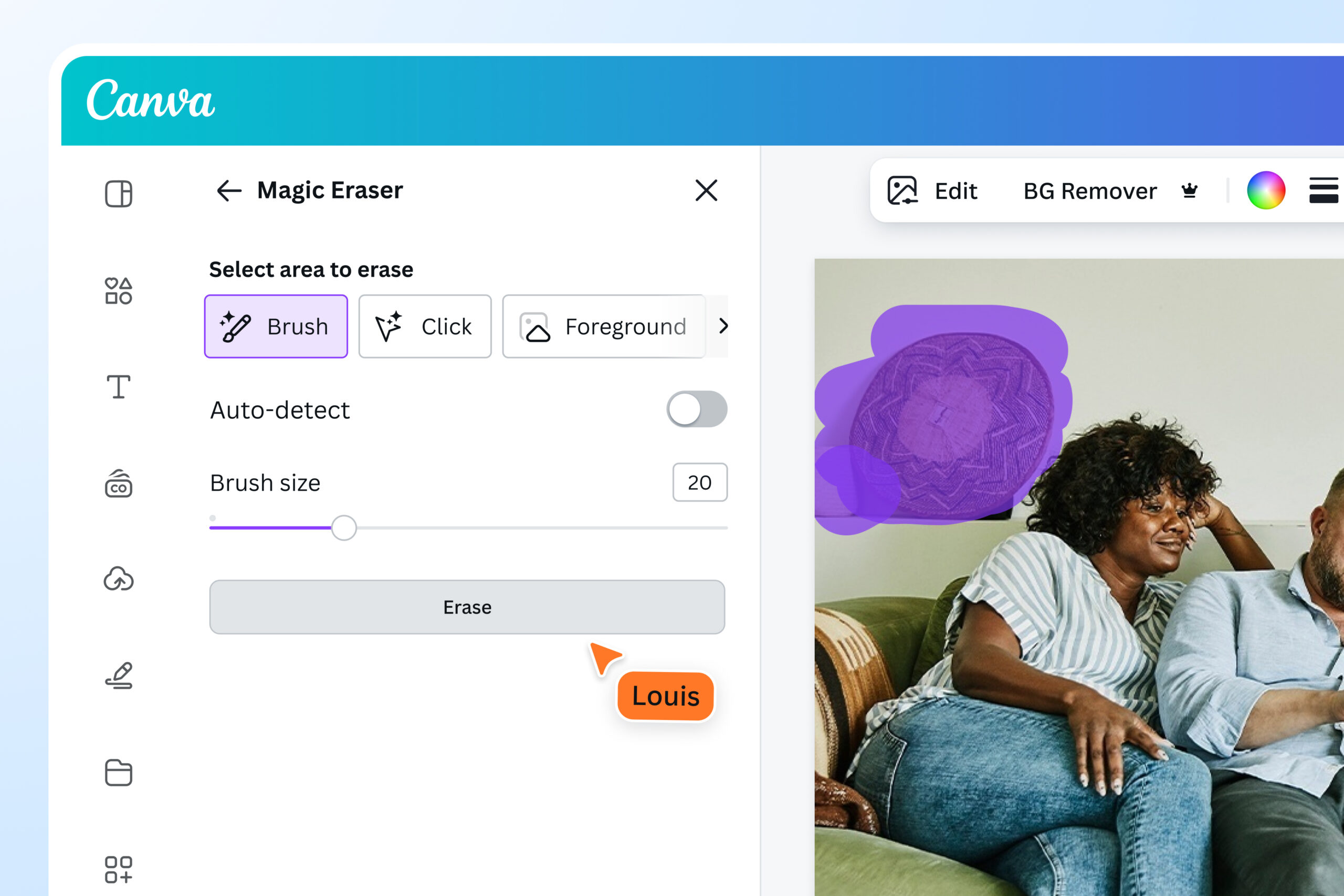
Magic Remover AI: Revolutionising Image Editing
In the ever-evolving world of technology, artificial intelligence continues to reshape various industries, and image editing is no exception. Enter Magic Remover AI, a cutting-edge tool designed to simplify and enhance the process of removing unwanted elements from images with remarkable precision.
What is Magic Remover AI?
Magic Remover AI is an advanced artificial intelligence application that enables users to seamlessly remove objects, backgrounds, or any undesired elements from their images. Utilising sophisticated algorithms and deep learning techniques, this tool analyses the visual context of an image to deliver impressive results that were once achievable only by skilled graphic designers.
Key Features
- Intuitive Interface: Magic Remover AI boasts a user-friendly interface that caters to both novices and experienced users. Its straightforward design ensures that anyone can quickly learn how to use it effectively.
- High Precision: The tool’s underlying AI technology allows it to perform intricate edits with high accuracy, maintaining the integrity of the surrounding area in the image.
- Fast Processing: Thanks to its powerful algorithms, Magic Remover AI can process images swiftly without compromising on quality.
- Versatility: Whether you’re dealing with complex backgrounds or simple object removals, this tool adapts to various scenarios effortlessly.
The Benefits of Using Magic Remover AI
The introduction of Magic Remover AI brings numerous advantages for individuals and businesses alike:
- Saves Time and Effort: Traditional methods of image editing can be time-consuming and require a certain level of expertise. Magic Remover AI automates much of this process, allowing users to achieve professional-grade results in a fraction of the time.
- A Cost-Effective Solution: By reducing the need for expensive software or professional services, Magic Remover AI offers an affordable alternative for those who regularly work with images.
- Aids Creativity: With technical barriers removed, users can focus more on their creative vision without being bogged down by tedious editing tasks.
The Future of Image Editing
The advent of tools like Magic Remover AI signifies a transformative shift in how we approach image editing. As artificial intelligence continues to advance, we can expect even more innovative solutions that will further democratise access to high-quality digital content creation tools.
If you’re looking for an efficient way to enhance your images without extensive manual effort, consider exploring what Magic Remover AI has to offer. Embrace the future of image editing today!
Frequently Asked Questions About Magic Remover AI: Understanding Its Functionality and Features
- How does Magic Remover AI work?
- Is Magic Remover AI suitable for beginners?
- What types of elements can Magic Remover AI remove from images?
- Does Magic Remover AI require an internet connection to function?
- Can Magic Remover AI handle complex backgrounds effectively?
- Is there a limit to the file size of images that Magic Remover AI can process?
- Are there any subscription plans for Magic Remover AI?
- Does Magic Remover AI offer a free trial period?
- How secure is the data processed by Magic Remover AI?
How does Magic Remover AI work?
Magic Remover AI operates by leveraging sophisticated algorithms and deep learning techniques to identify and remove unwanted elements from images with precision. When an image is uploaded, the AI analyses its visual context, recognising objects, backgrounds, and other components. By understanding the relationships between these elements, the tool can seamlessly erase specified areas while maintaining the integrity of the surrounding pixels. This process ensures that edits appear natural and cohesive, making it easy for users to achieve professional-quality results without extensive manual intervention. The AI’s ability to learn from vast datasets allows it to improve continuously, adapting to various scenarios and delivering impressive outcomes across a wide range of images.
Is Magic Remover AI suitable for beginners?
Magic Remover AI is exceptionally suitable for beginners, thanks to its intuitive and user-friendly interface. Designed with simplicity in mind, the tool allows users with little to no experience in image editing to achieve impressive results effortlessly. The straightforward design and clear instructions guide users through the process, making it easy to remove unwanted elements from images without requiring advanced technical skills. Additionally, the tool’s automated features and intelligent algorithms handle complex tasks, ensuring that even novices can produce professional-quality edits with minimal effort. Whether you’re a hobbyist or new to digital content creation, Magic Remover AI provides an accessible entry point into the world of image editing.
What types of elements can Magic Remover AI remove from images?
Magic Remover AI is a versatile tool capable of removing a wide range of elements from images with remarkable precision. Whether you’re looking to eliminate unwanted objects, such as people, vehicles, or signage, or wish to clear up distracting backgrounds to highlight the main subject of your photograph, Magic Remover AI can handle it all. It excels at seamlessly erasing blemishes, text overlays, and even complex patterns that might otherwise detract from the overall composition. By intelligently analysing the visual context and using advanced algorithms, Magic Remover AI ensures that the surrounding areas remain natural and undisturbed, allowing users to achieve clean and professional results effortlessly.
Does Magic Remover AI require an internet connection to function?
Magic Remover AI does not require an internet connection to function, making it an ideal tool for users who need flexibility and accessibility. By operating offline, the software ensures that users can work on their image editing tasks without worrying about connectivity issues or data privacy concerns. This feature is particularly beneficial for those in remote areas or environments with unreliable internet access. Moreover, the ability to use Magic Remover AI offline allows for faster processing times, as all computations are performed locally on the user’s device. This enhances both the efficiency and convenience of the image editing process, providing a seamless experience regardless of location.
Can Magic Remover AI handle complex backgrounds effectively?
Magic Remover AI is designed to expertly manage even the most complex backgrounds, thanks to its advanced algorithms and deep learning capabilities. By analysing the visual context of an image, it can distinguish between the primary subject and intricate background elements with remarkable accuracy. This enables the tool to seamlessly remove unwanted objects while preserving the integrity and natural appearance of the surrounding area. Whether dealing with detailed textures, multiple layers, or varying depths, Magic Remover AI adapts to these challenges, providing users with professional-grade results that maintain the overall aesthetic of the original image.
Is there a limit to the file size of images that Magic Remover AI can process?
Magic Remover AI is designed to accommodate a wide range of image sizes, ensuring flexibility and convenience for its users. However, like many digital tools, it does have certain limitations regarding file size to maintain optimal performance and processing speed. Typically, the service can handle most standard image files used in everyday scenarios without issue. For exceptionally large files, users may need to consider resizing the image or compressing it before uploading to ensure seamless processing. This approach helps maintain the efficiency and accuracy of the AI while delivering high-quality results. Users are encouraged to check any specific guidelines provided by Magic Remover AI regarding maximum file size limits to optimise their experience.
Are there any subscription plans for Magic Remover AI?
Magic Remover AI offers a range of subscription plans tailored to meet the diverse needs of its users. Whether you’re an occasional user or a professional requiring frequent access, there is a plan to suit your requirements. The subscription options typically include monthly and annual plans, providing flexibility and value for money. Subscribers benefit from access to premium features, regular updates, and priority customer support, ensuring they can make the most of the tool’s capabilities. By offering various pricing tiers, Magic Remover AI ensures that both individuals and businesses can take advantage of its innovative image editing technology without breaking the bank.
Does Magic Remover AI offer a free trial period?
Magic Remover AI recognises the importance of allowing users to experience its capabilities before committing to a purchase. As such, it offers a free trial period that enables potential users to explore its features and witness its effectiveness firsthand. During this trial, users can experiment with removing unwanted elements from their images and assess the tool’s ease of use and precision. This opportunity allows individuals to make an informed decision about whether Magic Remover AI meets their image editing needs, ensuring satisfaction and confidence in their choice.
How secure is the data processed by Magic Remover AI?
Magic Remover AI prioritises the security and privacy of its users’ data. All images processed by the tool are handled with strict confidentiality measures in place. The platform employs advanced encryption protocols to protect data during transmission and storage, ensuring that no unauthorised access occurs at any stage. Additionally, Magic Remover AI adheres to industry-standard data protection regulations, providing users with peace of mind regarding their personal information. Once processing is complete, images are promptly deleted from the servers to further safeguard user privacy. Users can confidently utilise Magic Remover AI, knowing that their data is secure and treated with the utmost care.